
AI without losing the personal touch8 min read
How to Review Client Check-Ins Faster with AI: 7 Tools Compared
Disclosure: we make Grytt, one of the seven tools here. Sources are at the end, and there's a section on when Grytt is the wrong choice.
Contents
- What can AI do with client check-ins?
- Which coaching apps review check-ins with AI?
- What should a good AI weekly review contain? The one-change review
- What should AI never decide in a check-in?
- How do you roll out AI check-ins without clients noticing a robot?
- When isn't Grytt the right fit?
- FAQ
- The bottom line
- Sources

An AI check-in review should take a client's whole week (training, food, sleep and their check-in answers) and hand you one decision to approve. The best tools draft the summary and the reply, and nothing reaches your client until you say yes.
The time saved doesn't come from how fast the AI writes. It comes from what a good review leaves out. Below: what seven coaching tools actually do with check-ins, the review format we use, and what AI should never decide.
What can AI do with client check-ins?
AI can do three jobs with a check-in: draft your reply, flag which clients need you first, and summarise the client's week into a review. Most tools do one of the three. Very few do all of them.
- Reply drafting saves typing. You still read everything first. More in can AI answer your clients' messages?
- Triage saves deciding where to start. It sorts your roster before you open a single check-in. See the red-amber-green week.
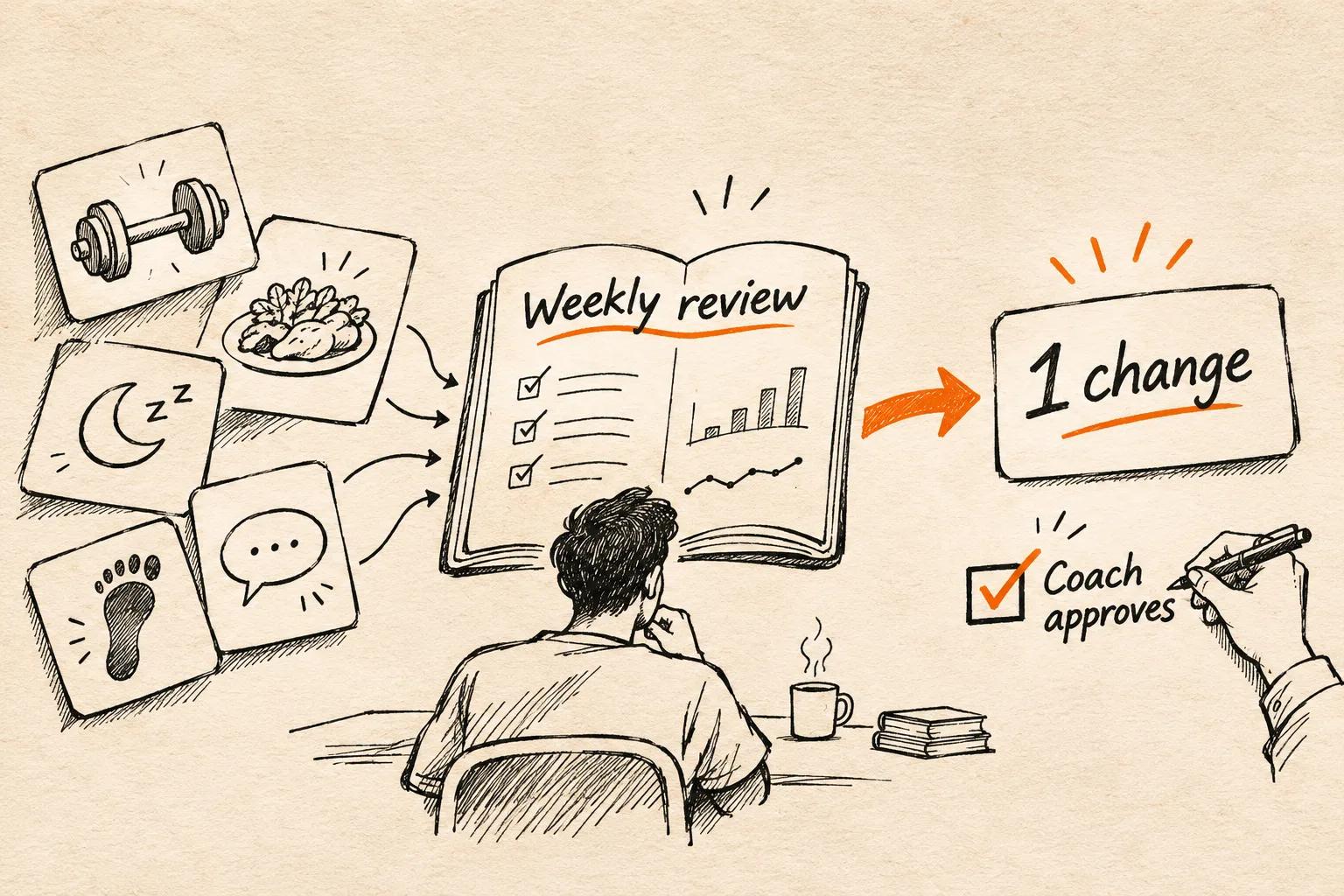
- Weekly review saves reading. It pulls training, food, sleep and answers into one page, so you read one summary instead of four screens.
The slow part of a check-in is usually the reading and the deciding, not the typing. A tool that only drafts replies speeds up the fastest step.
Which coaching apps review check-ins with AI?
Seven tools do some form of AI check-in work today. The table shows what each one reads, what it writes, and whether you approve before the client sees anything. Checked on 20 November 2026, from each company's own pages.
| Tool | What it reads | What it writes | You approve first? | Availability |
|---|---|---|---|---|
| Grytt | Training, food, sleep, steps, resting heart rate, habits and recent check-in answers | A weekly review with one recommendation, plus a drafted check-in | Yes. The review is never sent; the check-in goes only after you confirm | Early access, on Plus and Pro |
| MacroActive (COACH.) | Check-in answers, food log, workout notes, community posts | A review sorted into "act on", "wins" and "context", plus reply drafts | Yes: "Nothing sends until you send it" | Opt-in via support |
| Assistant Coach | Check-ins, photos, metrics, workout logs | Reply drafts, trends and red flags | Yes, you edit and send | Free up to 5 clients; paid plans on beta pricing |
| Kahunas (Crew) | Check-ins, logs and messages | A daily list of who needs you, plus draft programs, meal plans and forms | Yes. Crew can't message clients | From 50 clients, on AI credits |
| My PT Hub (Check-Ins AI) | Check-ins and client data (details not listed) | Personalised feedback | Not stated on its pages | Premium plan |
| Fitness Check-In AI | Check-ins you upload | Summaries, red flags, compliance scores and replies | Not stated | Free to $99 a month |
| Everfit (AI Smart Response) | The current chat, your FAQ and saved replies | Draft chat replies in a tone you pick | Yes, drafts only | Paid plans, plus AI credits |
- Trainerize has no built-in AI check-in review on its own pages. Its blog suggests pasting check-in answers into "your AI tool of choice".
- Time savings are the vendors' own claims. My PT Hub says check-in admin drops "by 80%". Assistant Coach says replies go "from 15 minutes to 2". Neither publishes how that was measured.
What should a good AI weekly review contain? The one-change review
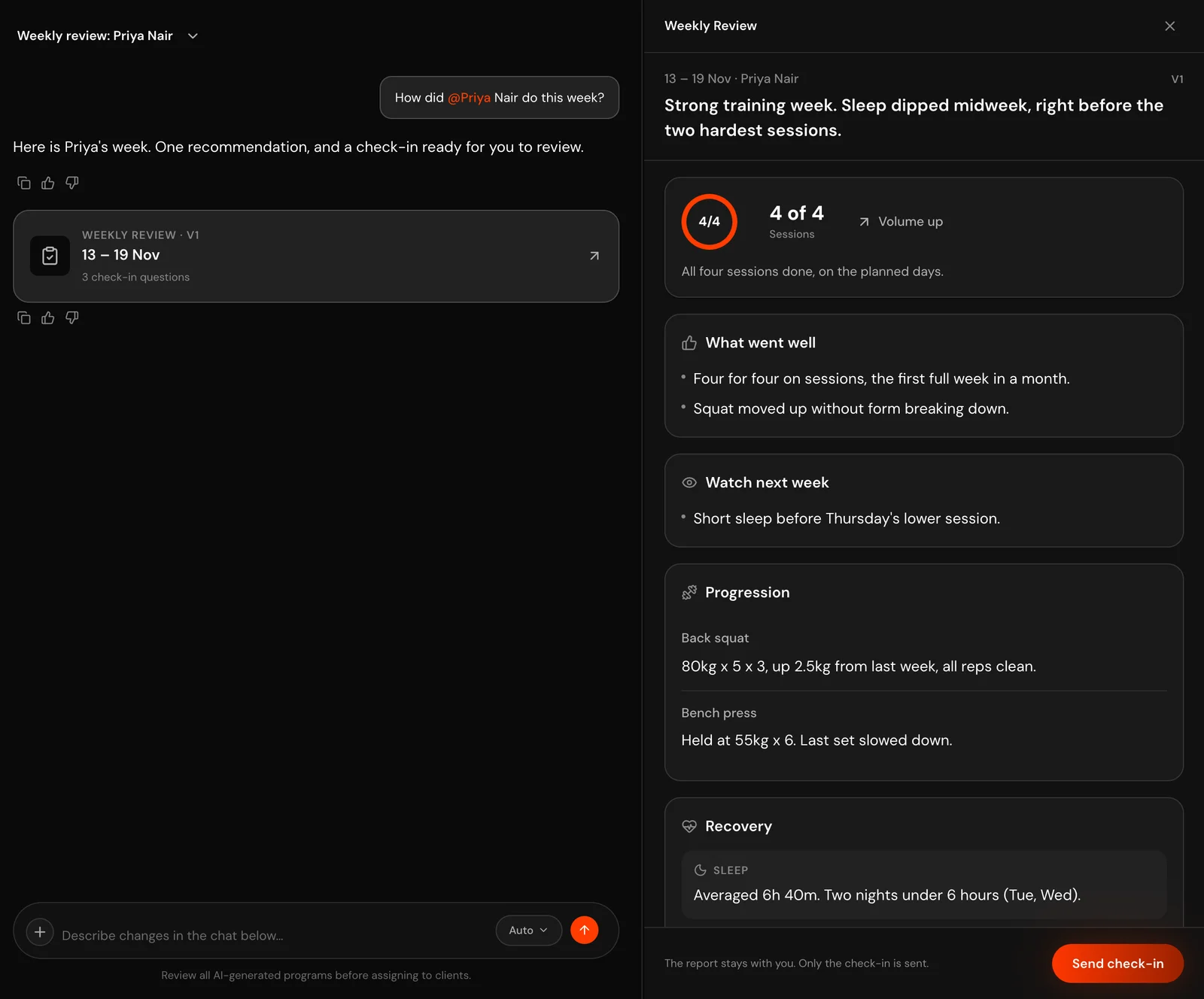
A good weekly review has seven short parts and ends in exactly one change. If it ends in five changes, the client makes none of them.
- Headline. One sentence on the week. "Strong training week, sleep slipped midweek."
- Adherence. Sessions done against sessions planned. Numbers, not adjectives.
- Training. Volume up, flat or down, and how the main lifts moved.
- Recovery. Sleep, energy, stress and soreness, as trends.
- Nutrition. Calories and protein against target, and the biggest gap.
- What went well. Always include one. Clients who only hear problems stop checking in.
- Watch next week. The one thing that might go wrong.
Then two endings: one recommendation (the single change for next week), and 2 to 5 check-in questions written for this client's week, not your generic form.
Trends beat single sessions. One bad Tuesday isn't a pattern. Three short nights in a row before training days is.
No AI tool? You can run the same format in ChatGPT or Claude. Remove the client's name first, and only paste data your client has agreed to share.
You are helping an online fitness coach review one client's week.
Use only the numbers below. If a number isn't here, don't mention it.
Write, in this order:
1. Headline (one sentence)
2. Adherence (sessions done vs planned)
3. Training (volume up/flat/down, main lifts)
4. Recovery (sleep, energy, stress, soreness: trends only)
5. Nutrition (calories and protein vs target, biggest gap)
6. What went well (at least one thing)
7. Watch next week (one thing)
Then: ONE recommendation for next week, and 2 to 5 check-in questions
specific to this week.
Never diagnose, never suggest supplements or medication, and if the
client mentions pain, illness or worries about food, write
"COACH TO REPLY" and stop.

Client week:
[paste training, food, sleep and check-in answers]
What should AI never decide in a check-in?
AI should never decide anything that needs a clinician or a conversation. Pain, injury, illness, medication, worries about food or body image, and signs of distress all go straight to you, with no draft.
Three more rules keep a review honest:
- Only real numbers. If the client didn't log it, the review doesn't mention it. A made-up "about 7 hours of sleep" is worse than a blank.
- Refuse when the data is thin. If two of training, food and check-in answers are missing, the right output is "not enough data this week", not a confident guess.
- No diagnosis, no supplements. "Your iron might be low" is not a coaching call, from you or from software.
Grytt's weekly review follows these rules: it only quotes numbers that are in the data, it refuses when too little was logged, and it doesn't give diagnosis or supplement advice.
How do you roll out AI check-ins without clients noticing a robot?
Run it in shadow mode for two weeks before any AI text reaches a client. You'll catch where it sounds wrong while it's still private.
- Week 1: write first, then compare. For 5 clients, write your review as usual, then generate the AI one. Note what it missed and what it got right.
- Week 2: AI first, you edit. Start from the AI draft for the same 5 clients. Time each check-in.
- Week 3: widen it. Add the rest of your roster if your edits are getting smaller. Keep reading every review before it goes out.
- Keep your phrases. Add the lines you always write ("Proud of this week") to the tool's preferences or your prompt.
Clients notice a robot when a reply is generic, not when it was drafted. A draft that names their Tuesday deadlift and their short Thursday night doesn't read like a robot.
When isn't Grytt the right fit?
We'd rather you pick the right tool than the wrong one from us. Pick something else if:
- You want AI available today, without an invite. Grytt's AI is in early access on Plus and Pro, not the free plan. MacroActive, Assistant Coach and Everfit are available now.
- You want every client's review generated in one batch. Grytt writes a review when you ask for a client. It doesn't run on a schedule across your whole roster.
- You need progress-photo analysis. Assistant Coach compares photos. Grytt tracks them but doesn't analyse them.
- You want payments in the same app. Grytt doesn't have them yet.
- You want something with lots of reviews. Grytt is new.
Frequently asked questions
Can AI review client check-ins for me?
Yes. AI can read a client's check-in answers and logged data, then draft a summary and a reply. You still decide what changes and approve anything the client sees.
What is the best AI tool to review client check-ins?
It depends on what you need it to read. MacroActive and Grytt read the whole week, Assistant Coach adds progress photos, and Everfit drafts chat replies rather than reviewing check-in forms.
How do I speed up weekly check-ins?
Sort clients by who needs you before you read anything, collect data automatically instead of asking for it, and have AI draft a review that ends in one change you approve.
Does Trainerize have AI check-in review?
Not as a built-in feature on its own pages as of 20 November 2026. Trainerize's blog suggests pasting check-in answers into an AI tool of your choice to draft a reply.
Is it safe to paste client check-ins into ChatGPT?
Only with your client's consent, and without their name or other details that identify them. Check-ins hold health data, so treat them like medical notes.
The bottom line
Every tool here can write a paragraph about your client's week. The useful ones end with a single decision, refuse when they don't know, and leave the hard messages to you.
AI shouldn't make your check-ins longer. It should make them shorter and still yours.
If that's how you want to run check-ins, start Grytt free for your first 10 clients. The AI review is in early access on Plus and Pro. For prices across the main coaching apps, see our software comparison.
Sources
Checked on 20 November 2026. AI features change fast, so check each tool's page before you buy.
- MacroActive: 1:1 Check-In Agent
- Assistant Coach: website, PeerPush listing
- Kahunas: Crew
- My PT Hub: automated check-ins, AI tools article
- Fitness Check-In AI: Product Hunt listing
- Everfit: AI Smart Response, AI credits and plans
- Trainerize: client check-in system
- Grytt: pricing

Written by
Online coach, Grytt team
Aromal Das is an online fitness coach and part of the Grytt team. He coaches clients online and writes about the tools and habits that make online coaching work.